Note on Downloading
Chromium-based browsers (like Chrome, Edge) have stopped supporting the FTP protocol. Please use a non-chromium browser like Firefox to download software from the links on this page.
System Requirements
- Hardware: Processor: i3 equivalent or above, RAM: 2GB (min) 4GB or higher (recommended)
- OS: Windows 7(SP1), 8, 8.1 or 10 (32bit / 64bit) with minimum 1024x768 resolution
- Disk Space: Minimum 500 MB
- Microsoft Office 2007 or higher (to view packet trace, event trace, exported results)
- Microsoft Visual Studio 2015 (to work with protocol C source codes)
- Must be able to ping the NetSim license server on the LAN.
Download Links
Extract the zipped file to a local drive (e.g., "D:\") and run the setup.
- NetSim V10.2
- NetSim V11 (32-bit)
- NetSim V11 (64-bit)
- NetSim Academic V11.1 (32-bit)
- NetSim Academic V11.1 (64-bit)
- NetSim Standard C13.0.29 (64-bit)
Note: If you have a project created in version 10.2, please use only
version 10.2 due to compatibility issues. You can uninstall it and install version 11 after
you are done with your older projects.
Installation
1. Manual Installation
- Double click on NetSim setup (.exe) to start the installation.
- Click on OK, Next, I Agree, Install, Finish when prompted. No customization is required.
- Installation of NetSim and third-party tools will proceed in order (Wireshark, WinPcap, etc.).
- After installation, a shortcut will be created on the desktop.

2. Silent Installation
- Open command prompt and change directory to the setup file's location.
- Run the exe with arguments:
setup.exe /S /silent=1

Wait for the uninstaller (uninst.exe) to be created in the installation directory.

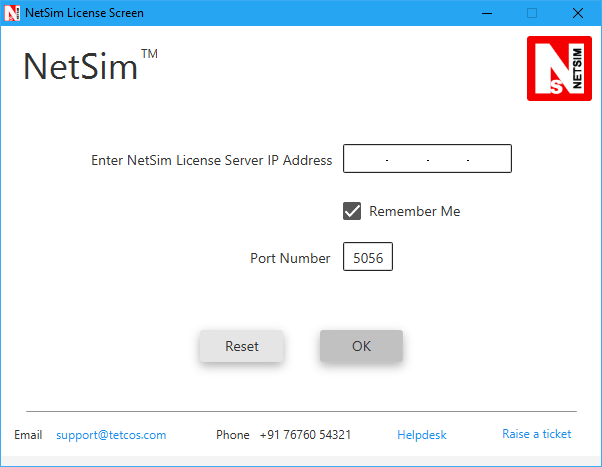
Double click the desktop shortcut to start NetSim. The installation is successful if it asks for the License Server IP.
License Configuration
To run NetSim, enter the license server IP address as 172.31.1.12 and Port Number as 5056.
Help and Support
- NetSim Help manuals are available in <NetSim_Install_Directory>/Docs/HelpFile
- Visit the official website: https://www.tetcos.com
- For technical support, refer to the NetSim Knowledgebase.
- Raise support tickets at TETCOS Support.
- For videos and webinars, visit the YouTube channel.